
Table of Contents
Foreword
Recently, I have been reading a lot about operating systems, especially those with hard time constraints, commonly known as Real Time Operating Systems aka RTOS. I have been experimenting with RTEMS and have even contributed upstream.
During this time, I started reading about filesystems and how they are implemented. I am currently following the OSDev wiki page on filesystems and Part 3, “Persistence,” of the book Operating Systems: Three Easy Pieces , along with similar articles on the internet. And filesystems are fascinating to say the least.
In this short writing, I make an attempt at trying to explain what I understood and things that amazed me about filesystems.
Persistence
Persistence is the characteristic of data or a system state to outlive the process that created it. For example, if you create a text file hello.txt with the content "Hello World", even after you close your text editor and shut down your computer, you can turn your computer on again and inspect the file to see that the contents are still present. This is a very crude explanation, but that is basically persistence in this context.
Filesystems
As with every component in an operating system, a filesystem is an abstraction over something else, over disks and other storage media, and Linux takes this to the extreme. There are actual hardware devices represented as normal files in the tree hierarchy. Don’t believe me? Run:
cat /dev/input/mice
Then move your mouse. You will see seemingly random characters printed in the terminal, that is literally what your mouse is sending to the kernel via USB.
Filesystems provide an abstraction and an easy interface to read and write data and even persist it without worrying about how the data is handled, stored, or managed.
Files & Directories
There are two different types of abstractions created by filesystems, Files and Directories.
Files
A file is, as it appears on the surface, an array of bytes with a name associated with it. Operating systems do not know the type of data it stores, it could be a text file, a PNG image, or even executable code. Rather, the operating system only cares about ensuring that the data is persisted across reboots with consistency and no data loss.
A file also has an internal number commonly referred to as the inumber or inode number. This can be thought of as the “internal unique name” used by the operating system. We will learn more about inodes later.
Directories
Directories, on the other hand, appear to contain other files and directories in a tree like structure. In most filesystems, directories contain a set of pairs consisting of a human readable name and the inumber of the files and directories they contain.
This creates a tree like hierarchy in which directories can contain files and other directories. In most Unix like systems, there is also a concept of a root directory, commonly denoted by /. It is the topmost directory, which contains all other files and directories.
Here is an example of such structure:
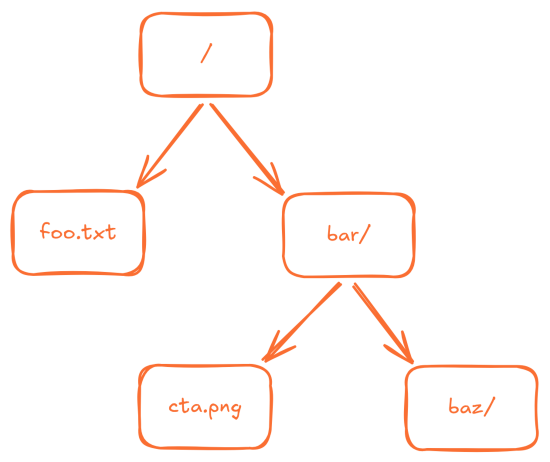
This has one root directory, denoted by /, which contains a file named foo.txt and a directory named bar. This bar directory contains a file cta.png and another directory named bar, overall creating a structure that resembles a tree. These underlying files and directories can be referenced using a “path.” A path is a collection of human readable names of files or directories joined together by a delimiter. In most Unix systems, this delimiter is simply /. For instance, the file cta.png can be referenced as /bar/cta.png.
If you inspect bar directory it would look something like:
[
   ("."      ,  21262482),
   (".."     ,  21261953),
   ("baz"    ,  21261951),
   ("cta.png",  21262481),
]
We find our file cta.png and the directory bar, but what are . and ..? In most Unix like operating systems, . denotes the current directory and .. denotes the parent directory. Even empty directories, at the very least, contain these two entries in order to maintain the tree structure.
You can inspect this right now by running:
ls -lia -a
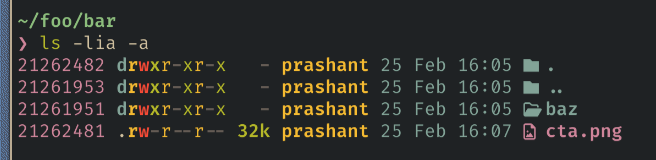
Also, the numbers you see on the left are inode numbers of the respective entries as it is in the filesystem.
Another thing to keep in mind is that there is no enforcement that a file name ending with .png, such as our cta.png, must actually be a PNG file. This is merely a convention.
The Structure
There are a million different ways to implement filesystems, all of which have different advantages and disadvantages. The one I am going to discuss here is extremely simple and barely scratches the surface.
Blocks
The first step in implementing a filesystem is to divide the storage medium into fixed (though not always) chunks, since disk reads and writes do not occur at the byte level but rather in chunks.
Imagine we have 256KB of memory

We will divide this memory into 4 KB chunks. They are grouped into sets of eight only for easier understanding and do not hold any special meaning.

So, what do we store in these blocks? The first thing that comes to mind is user data. Let’s say we reserve blocks 8 to 63 for this purpose.

But we also need to store information such as permissions, modification date, creation date, its owner, and other similar details, we need to store metadata.
The Inode
The Index Node, or Information Node, commonly referred to simply as the inode, is a core data structure in filesystems. Almost every filesystem you have ever heard of has some form of inode. Take a look at the inode used in the ext4 filesystem as it is defined inside the Linux kernel here
Each inode has a unique number known as its inumber, this is the “internal name” discussed earlier. An inode can store all kinds of information you would want in your filesystem, such as the block number it points to, how many blocks it occupies, file size, modification date, creation date, owner, and much more.
For our filesystem, let's say the size of a single inode structure is exactly 256 bytes, so one 4KB block can store exactly 16 inodes
$inodeSize = 256$
$blockSize = 4 \times 1024$
$blockCount = blockSize \div inodeSize$
$= (4 \times 1024) \div 256$
$= 16$
If we consider 5 blocks for our inodes, we should be able to store $(5 \times 4 \times 1024) \div 256$ or $80$ inodes. That is more than enough for our 64 blocks memory.

Individual inodes would look something like this:
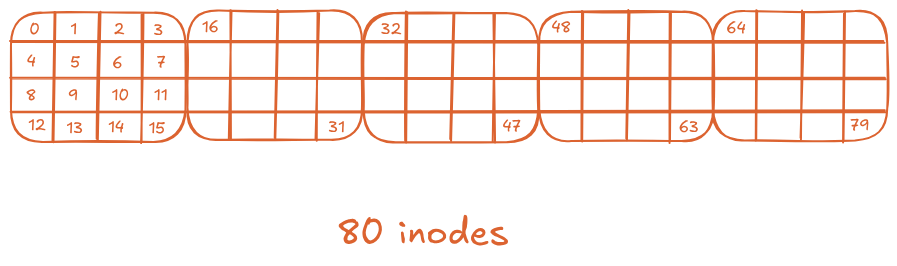
Another property we require from our filesystem is that, given the number of an inode, it should be able to compute where that inode is stored on disk.
So, for example, let's say we want to retrieve the inode 32, since we know the size of each inode (256 Bytes) and the base address of the first inode (start of forth inode, 12KB), we can compute the address of inode 32 by doing:
$offset = sizeof(inode\_t) \times 32$
$addr = baseAddr + offset$
$= (12 \times 1024) + (256 \times 32)$
$= 20480$
$= 20KB$
We can retrieve any specific inode but how do you we know if a inode or a data block is free or occupied?
BitMaps
There are multiple ways of tracking free nodes, but we are going to examine the most basic one: bitmaps. A bitmap is a very simple structure, a chunk of memory representing whether a block is free (bit set to 0) or occupied (bit set to 1).
In our case, where each block is 4 KB in size, one block could represent $4 \times 1024 \times 8$, or $32{,}768$ blocks. That is more than enough for storage of this size, but we would need two of these: one for inodes and one for user data blocks.

Superblock
In modern Unix systems, you can have multiple types of filesystems at the same time, mounted at different mount points. Mounting is essentially connecting the root of one filesystem to a path within another filesystem. You can list all these mount points by running the mount command without any arguments.
$ mount
devtmpfs on /dev type devtmpfs (rw,nosuid,size=788808k,nr_inodes=1965778,mode=755)
devpts on /dev/pts type devpts (rw,nosuid,noexec,relatime,gid=3,mode=620,ptmxmode=666)
...
<REDACTED FOR SANITY>
...
binfmt_misc on /proc/sys/fs/binfmt_misc type binfmt_misc (rw,nosuid,nodev,noexec,relatime)
tmpfs on /run/user/1000 type tmpfs (rw,nosuid,nodev,relatime,size=1577612k,nr_inodes=394403,mode=700,uid=1000,gid=100)
gvfsd-fuse on /run/user/1000/gvfs type fuse.gvfsd-fuse (rw,nosuid,nodev,relatime,user_id=1000,group_id=100)
portal on /run/user/1000/doc type fuse.portal (rw,nosuid,nodev,relatime,user_id=1000,group_id=100)
As you can see, there are more than 25 different filesystems mounted on my machine at the same time. It is therefore crucial for the operating system to understand and treat them accordingly, because each behaves differently and has different properties and parameters. How does the operating system know this?
We place a special block at the beginning of the storage medium that stores metadata about the filesystem itself, such as the block size, supported features, version, and more. The operating system can read this information and determine the type of filesystem it is operating with.

Finishing
This filesystem has several limitations, such as not being able to handle large files, missing support for symbolic links and cleanup system, suffering from fragmentation, and much more, but it is a starting point nonetheless. It can be further extended by studying other filesystems like ext4 or even a flash filesystem like jffs2 but until next time.